Editable Office Work Planner Canva
If you’ve ever stared at a blank calendar, scrambled to track deadlines across three apps, or lost hours updating spreadsheets just to stay organized—this is your reset button. The Editable Office Work Planner Canva isn’t another static PDF you print and abandon. It’s a living, breathing productivity system—designed for real work, real people, and real constraints.
What makes it different? You don’t just download and use. You own the layout. You choose the font that reflects your tone—clean sans-serif for corporate clarity, warm script for creative studios, bold monospace for tech teams. You swap backgrounds to match your brand palette or switch to minimalist white for laser focus. You add your logo to the “Belongs To” page, rename sections to fit your workflow (“Client Project Log” becomes “Freelance Pipeline”), and even embed screenshots of live dashboards into meeting notes pages.
This planner ships as a ready-to-upload KDP interior file—fully print-ready, bleed-safe, CMYK-optimized, and formatted to Amazon’s latest KDP specs. No last-minute resizing, no ghost margins, no font substitution warnings. But crucially, it also includes a direct, editable Canva link. That means zero design software licenses, zero learning curve—and full control over every pixel, color, and spacing decision.
More Than Pages—It’s Your Workflow, Structured
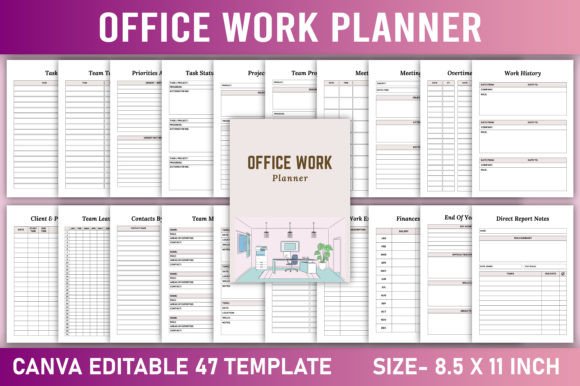
The 40+ included pages aren’t filler. Each solves a documented pain point:
- Daily/Weekly/Monthly Planners with time-blocking zones—not just lines, but intentional space for energy tracking and priority flags.
- Hours Worked Log + Overtime Tracker + Timesheet—syncs seamlessly with payroll tools or client billing, especially useful for freelancers quoting hourly rates or small shops managing part-time staff.
- Team Task List + Team Project Plan + Direct Report Notes—built for hybrid teams. Use the “Team Leave Tracker” to avoid scheduling conflicts; drop in Slack avatars or team headshots directly in Canva.
- Objectives Tracker + Deadlines Tracker + Priorities Assessment—not just checklists, but visual scaffolding for OKR alignment and quarterly reviews.
- Work Contacts + Contacts By Expertise + Client Project Log—turns scattered notes into searchable, actionable relationship maps (e.g., tag “Legal – Contract Review” or “Design – UI Audit” for instant filtering).
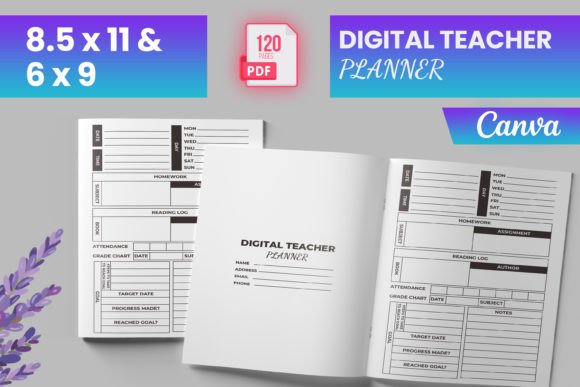
And yes—it includes paper structure guidance: optimal trim size (8.5" × 11"), recommended paper weight (70–100 lb text), and spine width calculations for perfect binding. If you’re publishing on KDP, those details save hours of trial-and-error.
Where This Planner Earns Its Keep
For solopreneurs and freelancers: You’re wearing five hats before breakfast. The “Task Time Required” page helps you price projects accurately—not guess. The “Finances Tracker” links income to specific clients or campaigns. The “Professional Development” log keeps certifications, course completions, and skill gaps visible—not buried in email threads.
In small offices or retail shops: The “Annual Leave Tracker” prevents coverage gaps during holiday rushes. “Routine Tasks” can list opening/closing checklists for baristas, inventory audits for boutiques, or safety walkthroughs for workshops—all editable to match SOPs. Print one copy per shift, or assign digital versions via Canva’s shareable links.
For educators and trainers: Swap “Work Trips” for “Field Trip Logistics,” repurpose “Meeting Notes” as “Parent Conference Summaries,” and use “Objectives Plan” to map lesson outcomes to district standards. Educators using this report cutting prep time by 20–30%—because they’re not rebuilding templates each semester.
For content creators and marketers: The “Project Plan” page handles campaign timelines from ideation to analytics review. “Follow Up Items” auto-tags reminders (e.g., “Email podcast guest re: clip usage”). “Resources” becomes a living media kit—embed Canva-designed social banners, style guide snippets, or swipe files.
Customization That Actually Works
Many planners claim “editable”—but lock you into rigid fonts, unchangeable grids, or low-res placeholders. Not this one. In Canva:
- Replace any image—even icons—with your own SVGs or transparent PNGs.
- Adjust column widths in tables without breaking alignment.
- Change grid line opacity to reduce visual noise—or remove them entirely for a clean, modern look.
- Add password-protected links to internal wikis, Notion dashboards, or Google Sheets behind QR codes (yes, you can generate and embed those).
- Export individual pages as PNGs for social posts or slide decks—no cropping needed.
And because it’s built in Canva, collaboration is frictionless. Share edit access with your VA, co-author, or operations manager. Leave comments directly on the “Team Project Plan” page. Version history keeps you safe if someone accidentally deletes a section.
Practical Tips Before You Publish or Print
• Test print first: Even with KDP-optimized files, run a single-copy proof. Check margin clearance on inner gutters and verify grayscale conversion if printing B&W.
• Brand consistency matters: If you’re selling this as a branded planner, use Canva’s brand kit to lock colors and fonts—so every page feels unified, not like a collage.
• Don’t overload early pages: The “Belongs To” and “End Of Year Review” pages are high-engagement spots. Add subtle motivational quotes or your mission statement—but keep whitespace generous. Clutter undermines trust.
• Think beyond paper: Many users export weekly pages as PDFs and annotate them digitally with GoodNotes or Remarkable. Others convert “Meeting Notes” into reusable Notion templates. The flexibility is intentional.
This isn’t about perfection. It’s about reducing cognitive load so your energy goes toward decisions—not formatting. Whether you’re managing a 12-person agency, launching your first Etsy shop, or balancing remote work with homeschooling—the Editable Office Work Planner Canva meets you where you are. No setup fees. No subscriptions. Just clarity, control, and one less thing to reinvent.