Editable ADHD Planner for Kids Canva: A Practical Workflow Tool for Educators, Parents, and Creators
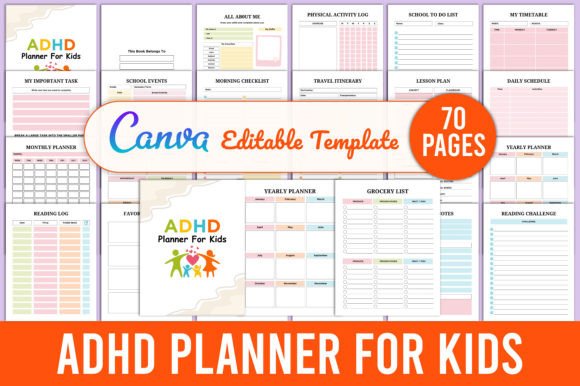
An Editable ADHD Planner for Kids Canva isn’t just another printable—it’s a workflow anchor. Designed for real-world use by educators building classroom supports, parents co-creating structure with neurodivergent children, and creators developing KDP interiors or digital planning assets, this resource bridges intention and execution. It works because it’s built on flexibility: editable in a free Canva account, exportable as high-quality PDF, JPEG, and PNG files, and structured to support consistency without rigidity.
How It Fits Into Real Planning Workflows
This planner doesn’t replace systems—it integrates into them. For teachers preparing IEP accommodations or 504 plans, the School Morning Routine, Homework Tracker, and Emotion Tracker become live documents they adapt weekly based on student feedback and behavioral data. For parents, the Daily Schedule and After-School Routine aren’t static checklists—they’re collaborative drafts refined over time using visual cues, timers, and co-regulation strategies. And for KDP publishers or Canva template designers, the interior layout serves as a production-ready foundation: organized by section, optimized for print bleed and readability, and fully layered for easy customization.
Unlike rigid planners that assume uniform attention spans or learning styles, this Editable ADHD Planner for Kids Canva anticipates variability. The Habit Tracker and Mood Tracker don’t demand daily perfection—they allow for partial completion, color-coded input, or skip days without breaking continuity. That design choice reflects how ADHD-informed planning actually works: iterative, forgiving, and grounded in observable behavior—not idealized productivity.
Before, During, and After Use: A Process-Oriented View
Before use: Preparation matters more than perfection. Open the Canva file and scan the 30+ sections—not to fill them all, but to identify 3–5 that align with your current priority. Is a child struggling with transitions? Focus on Morning Checklist, After-School Routine, and Daily Schedule. Launching a reading unit? Pull Reading Log, Book Review, and Reading Challenge. This selective approach prevents overwhelm and ensures early wins.
During use: Keep editing lightweight. Use Canva’s drag-and-drop text tools to adjust font size for readability, swap icons for familiar visuals, or add photo placeholders for personalization (e.g., a picture of the child’s backpack next to School Supply List). Export versions regularly—PDF for printing, PNG for digital whiteboards or tablet use, JPEG for quick sharing with therapists or tutors. Consistency builds from repetition, not complexity.
After use: Review—not revise. At week’s end, glance at the Weekly Goal Planner and Gratitude Journal side-by-side. Did completed goals correlate with positive emotional entries? Did missed homework entries cluster around specific subjects or times? These patterns inform next steps: adjusting timing, adding sensory breaks before Study Planner sessions, or simplifying the Chore Chart layout. The planner becomes a feedback loop—not just a record.
Integration With Other Tools and Methods
This Editable ADHD Planner for Kids Canva works alongside common frameworks—not against them. Pair the Time Management Worksheet with visual timers or Pomodoro apps. Link the Medication Tracker and Symptoms Tracker to telehealth notes or pediatrician visits. Use the Wellness Plan and Self-Care Planner to scaffold executive function skills taught in occupational therapy or social-emotional learning curricula.
For creators selling on KDP, the interior is pre-aligned for Amazon’s formatting standards: 8.5" x 11", 300 DPI, CMYK-safe colors, and clearly labeled layers. You can add your branding, adjust margins for perfect binding, or split sections across multiple interior files—all without redesigning from scratch. That compatibility saves hours in production while maintaining clinical and pedagogical integrity.
Practical Implementation Tips for Different Users
Educators: Print single-page sections on colored cardstock and laminate them. Use dry-erase markers on Class Schedule or Exam Timetable for real-time updates. Store blank copies of Brain Storming and Things To Do in student take-home folders for weekend reflection.
Parents: Start small—choose one routine (Morning Checklist) and one tracker (Water Tracker or Sleep Tracker). Involve your child in selecting stickers, fonts, or colors in Canva. That co-creation increases buy-in far more than any pre-designed aesthetic.
Creators & Publishers: Use Canva’s “Brand Kit” to save your palette and fonts. Duplicate pages for seasonal versions (e.g., Holiday Memories for December, Summer Reading Log for June). Export each section as a standalone PNG to build social media assets or email newsletter snippets—no extra design work required.
Long-Term Usability and Quality Control
The value compounds over time—not because every page gets used daily, but because the system adapts. A Yearly Planner page may sit unused until goal-setting season; a Doctor Visits Log might only activate during quarterly check-ins. That’s intentional design, not wasted space. What makes this Editable ADHD Planner for Kids Canva sustainable is its modularity: you maintain only what serves your current needs, then scale up or pivot as routines evolve.
Quality control happens in two places: first, in Canva—verify text alignment, contrast ratios, and spacing before exporting; second, in practice—observe whether a child reaches for the Emotion Tracker independently, or if a teacher reprints the Grade Tracker weekly without prompting. Those behaviors signal usability. If engagement drops, revisit the format—not the child’s effort.
What Makes This More Than Just a Template
It’s the intersection of accessibility and agency. The ALL ABOUT ME section invites self-identification before academic demands begin. The Favorite Authors and Favorite Quotes pages reinforce identity beyond diagnosis. The Travel Itinerary and Holiday Memories sections normalize planning for joy—not just obligation. That balance is rare in ADHD resources, which often default to deficit-focused tracking. Here, structure serves belonging—not compliance.
And because it’s editable in Canva, no technical barrier blocks iteration. You don’t need Adobe Illustrator or a design degree. You need a free account, 10 minutes, and clarity about one immediate need. That low entry point enables real-world adoption—by busy teachers, exhausted parents, and scrappy creators who need reliable, reusable assets—not theoretical ideals.
Final Thought: Planning as Partnership
An Editable ADHD Planner for Kids Canva succeeds when it fades into the background—not as a tool you manage, but as part of how you move through the day. It’s most effective when treated not as a test of discipline, but as a shared language: between parent and child, teacher and student, creator and customer. The 30 sections aren’t meant to be filled—they’re prompts for noticing, adapting, and responding. That’s where real progress lives: not in completion, but in consistent, compassionate engagement.