Crab Coloring Pages for Kids: A Practical Guide for High-Content KDP Creators
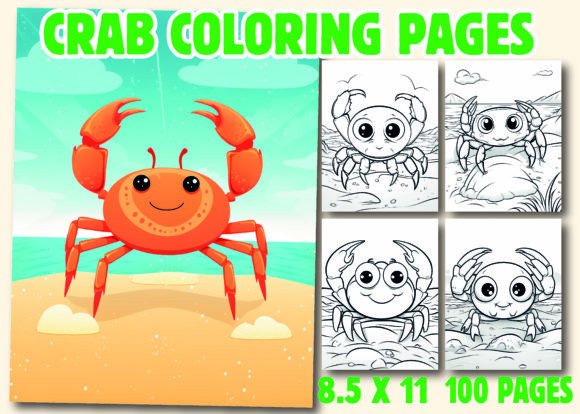
Crab Coloring Pages for Kids is a ready-to-publish interior resource designed specifically for Amazon Kindle Direct Publishing (KDP) creators building high-content coloring books. Unlike generic clipart bundles or single-theme printables, this collection delivers a cohesive, production-ready set of 100 unique crab-themed illustrations—each optimized for coloring, printing, and digital conversion. It’s not just a set of images; it’s a tested, structured interior foundation built around a consistent marine theme with age-appropriate complexity, line clarity, and visual variety.
What Makes This Crab Coloring Pages for Kids Collection Distinct?
At its core, this resource prioritizes practicality over novelty. Each of the 100 pages features hand-drawn or AI-assisted line art that balances simplicity for younger children (ages 4–8) with subtle detail for older kids (9–12). Crabs appear in diverse contexts: scuttling across sandy shores, hiding in coral reefs, perched on seashells, waving claws beside ocean waves, or even wearing sunglasses on tropical islands. The variation avoids repetition without sacrificing thematic unity—a common pitfall in low-effort themed collections.
The inclusion of three file formats—PDF, PNG, and JPG—supports multiple workflow needs. The PDF is pre-formatted to 8.5″ x 11″, bleed-free, and printer-ready. PNG files retain transparent backgrounds for custom layout adjustments in design tools like Canva or Adobe InDesign. JPGs offer lightweight compatibility for quick previews or thumbnail generation. Crucially, the AI source file (typically .ai or .svg-compatible) allows experienced designers to modify line weight, scale elements, or adjust spacing—something most royalty-free image packs don’t provide.
How It Compares to Other Interior Options
Many creators start with free SVG libraries or marketplace clipart. While those can be cost-effective, they often lack consistency in stroke width, scaling behavior, or stylistic cohesion—leading to noticeable jumps in visual quality between pages. Others use generative AI tools directly, prompting for “crab coloring page” repeatedly. That approach gives flexibility but demands time, prompt refinement, and post-processing to ensure uniform line thickness, centered composition, and KDP-safe margins. With Crab Coloring Pages for Kids, those variables are already resolved.
Compared to full-service KDP design agencies, this resource offers significantly more control and lower upfront cost. Agencies may deliver polished interiors, but revisions are often limited, and ownership of source files isn’t guaranteed. Here, you receive editable assets outright—no subscriptions, no licensing caps, and no attribution requirements. However, it does require basic familiarity with file handling and KDP’s formatting guidelines (e.g., ensuring 0.25″ margins, using CMYK for print if editing colors).
Strengths Worth Noting
- Theme depth: Crabs are portrayed in varied poses and habitats—not just front-facing silhouettes—supporting educational extension (e.g., discussing hermit crabs vs. fiddler crabs).
- Scalability: All 100 pages are sized to fit standard 8.5″ x 11″ without distortion, eliminating manual resizing across dozens of files.
- Format redundancy: Having PDF, PNG, and JPG versions reduces dependency on one software ecosystem—useful if your workflow shifts between Affinity Designer, Photoshop, or browser-based editors.
- KDP-tested structure: Pages follow proven interior conventions: no text overlays, no thin lines under 0.5 pt, and sufficient white space around central subjects—reducing risk of rejection during KDP review.
Tradeoffs and Realistic Limitations
This collection doesn’t include educational captions, tracing guides, or activity extensions (like mazes or word searches). If your goal is a hybrid learning-coloring book, you’ll need to layer those elements yourself—or choose a different product type altogether. Similarly, while the AI source file enables edits, it assumes working knowledge of vector tools. Beginners may find the PDF version easiest to use directly, but lose customization flexibility.
Another consideration is audience alignment. Crab Coloring Pages for Kids centers on marine life—but not all children respond equally to crustaceans. Some prefer mammals, dinosaurs, or fantasy creatures. If market research in your niche shows stronger demand for, say, “ocean animals” broadly (including dolphins, turtles, octopuses), then a crab-only focus may limit appeal unless paired with complementary titles in a series.
When This Is the Right Choice—and When It’s Not
Crab Coloring Pages for Kids fits best when you’re launching a targeted, low-risk KDP coloring book with clear thematic boundaries. For example: a summer-themed bundle (“Beach Day Coloring Book”), a classroom supplement for marine biology units, or a seasonal release tied to National Ocean Month (June). Its narrow focus supports strong keyword targeting—“crab coloring pages for kids,” “ocean animal coloring book,” “marine life coloring sheets”—without competing with broader, oversaturated terms like “animal coloring book.”
It’s less suitable if you need:
- Text-heavy layouts: No space is reserved for quotes, facts, or handwriting practice—so it won’t work for journals or educational workbooks without significant redesign.
- Multi-age adaptability: While lines are clean, there’s no tiered difficulty (e.g., simple outlines for ages 3–5 and complex patterns for ages 10+). You’d need to curate or edit pages manually for differentiation.
- Brand integration: Logos, watermarks, or custom cover-to-interior continuity aren’t built-in. You’ll add those during cover design or interior prep.
Practical Integration Tips for Your KDP Workflow
Start by reviewing the PDF interior as a whole—not page by page, but as a visual sequence. Look for pacing: Do intricate pages alternate with simpler ones? Does the variety of crab species and settings sustain interest across 100 pages? If needed, reorder pages in Adobe Acrobat or swap out 5–10 for personalization before final export.
For cover pairing, use one of the included high-resolution cover images—but verify that title font size and subtitle hierarchy meet KDP’s readability standards on both desktop and mobile thumbnails. Test-print 3–5 pages on your home printer to check line clarity and contrast before approving the final PDF for upload.
If you plan to expand into related titles, treat this as a modular asset. The AI source file lets you extract individual crab motifs to combine with other sea creatures later—building a cohesive “Ocean Friends” series without sourcing new illustrations each time.
Making an Informed Decision
Crab Coloring Pages for Kids sits at a specific point on the spectrum between fully automated AI generation and custom illustration. It offers more reliability than prompting from scratch, more flexibility than static clipart, and more thematic integrity than generic animal bundles. But it’s not a shortcut—it still requires thoughtful positioning, accurate metadata, and attention to KDP’s content policies (e.g., avoiding copyrighted characters or real-brand depictions).
Your decision hinges less on whether this is “the best” option and more on whether it matches your current capacity, goals, and niche strategy. If you value speed-to-market, consistency, and full file ownership—and your target audience responds well to marine themes—then Crab Coloring Pages for Kids provides a grounded, field-tested foundation. If you’re aiming for differentiated educational content, multi-format delivery (e.g., digital + printable), or cross-platform use beyond KDP, you may need to layer additional resources or explore alternative production paths.